Pattern
AAP Starter Kit

Status
 Sandbox
Resources
AAP Starter Kit
This pattern installs and configures Red Hat Ansible Automation Platform on OpenShift Container Platform by using a Config as Code (CaC) and GitOps approach. It uses the same concepts (and charts) as the Ansible Edge GitOps pattern, focusing on Ansible Automation Platform (AAP) itself rather than edge virtualization workloads.
The pattern deploys a single-cluster hub layout with OpenShift GitOps (single Argo CD), HashiCorp Vault, the External Secrets Operator, an AAP instance, and AAP configuration loaded from a CaC repository. Install variants add automation hub (with OpenShift Data Foundation for RWX storage), Ansible Lightspeed, CloudNativePG, and Automation Orchestrator.
You might fork the repository to customize chart overrides under overrides/ or to select a non-default install variant.
The Getting started page describes variant selection, required secrets, and verification steps.
Install variants
The pattern ships four install variants under variants/ in the repository.
Set main.variant in
values-global.yaml
before install.
The default is minimal-aap.
| Variant | main.variant | Purpose |
|---|---|---|
|
| Ansible Automation Platform 2.7 with controller and minimal CaC. Automation hub and Lightspeed are disabled. |
|
|
|
|
|
|
|
| Automation hub, Lightspeed, and Automation Orchestrator (includes OpenShift Data Foundation and CloudNativePG). |
Variant values live under variants/<name>/values-<name>.yaml.
The pattern enables global.singleArgoCD: true and global.vpNewFolderDir: true.
Keep variant and cluster group names short so GitOps server DNS labels stay within 63 characters (the complete variant is named complete-aap-ao for that reason).
Automation hub variants need RWX storage from the Validated Patterns OpenShift Data Foundation chart.
Automation Orchestrator variants install the CloudNativePG operator from |
See Installation details for what each variant deploys. For component schematics by variant, see Architecture.
Background
Teams that adopt Ansible on OpenShift often need a repeatable starting point that installs the operator and instance, wires secrets through Vault and External Secrets, and loads controller configuration from Git. This pattern provides that baseline and offers install variants so you can add automation hub, Lightspeed, or Automation Orchestrator without rebuilding the pattern from scratch.
Solution elements
Deploy Ansible Automation Platform on OpenShift Container Platform with GitOps
Load AAP configuration from a CaC repository
Optionally enable automation hub, Lightspeed, and Automation Orchestrator
Architecture overview
All variants run on a single OpenShift cluster (hub cluster group).
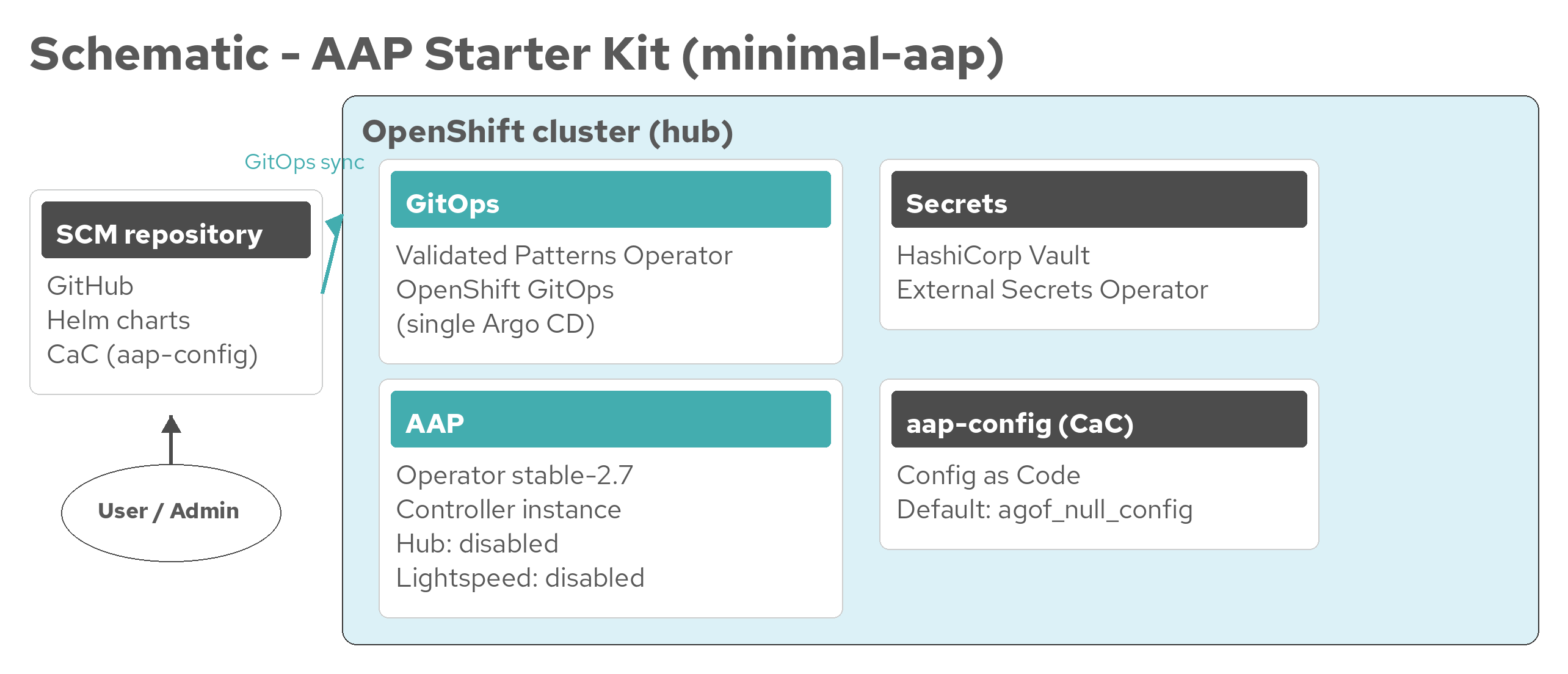
The default minimal-aap variant deploys Vault, External Secrets, the AAP operator and instance (controller; hub and Lightspeed disabled), and the aap-config CaC application.
Figure 1. AAP Starter Kit architecture (minimal-aap)
draw.io source: aap-architecture-minimal-aap.drawio
Other variants add OpenShift Data Foundation, automation hub, Lightspeed, CloudNativePG, and Automation Orchestrator. See Architecture for per-variant schematics and draw.io sources.
Next steps
Architecture — Component schematics and draw.io sources by variant
Getting started — Prerequisites, variant selection, and deployment
Installation details — Install sequence and expected installations
Cluster sizing — Resource requirements
