- architecture: amd64
  hyperthreading: Enabled
  name: worker
  platform:
    azure:
      type: Standard_D8s_v5
replicas: 3Azure requirements
This pattern has been tested on Microsoft Azure using self-managed OpenShift 4.19.28+ clusters provisioned with openshift-install.
OpenShift documentation contains details on how to install a cluster on Azure.
The documentation outlines the minimum required configuration for an Azure account.
Changes required
Do not accept default sizes for OpenShift install. It is recommended to increase the worker node size to at least Standard_D8s_v5.
This can be done by using openshift-install create install-config first and adjusting the workers under platform, for example:
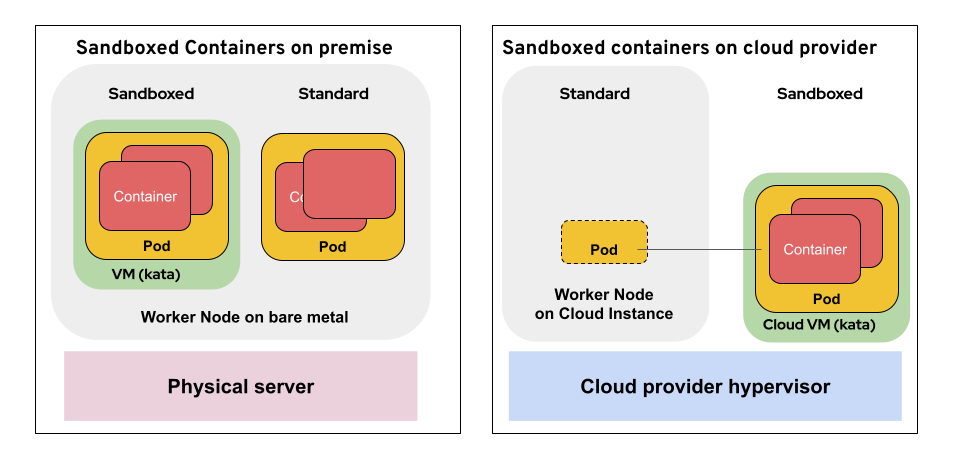
On a cloud provider the virtual machines for the kata containers use "peer pods" which are running directly on the cloud provider’s hypervisor (see the diagram below).
This means that access is required to Azure confidential VM families. Azure offers multiple confidential computing VM families including Standard_DCas_v5 (AMD SEV-SNP), Standard_DCes_v5 (Intel TDX), Standard_ECas_v5 (AMD SEV-SNP, memory-optimized), and others. This pattern defaults to Standard_DCas_v5 but can be configured to use other confidential VM families by modifying the VM size parameters in values-global.yaml.
These confidential VMs are NOT available in all regions. Check Azure products by region to confirm availability of your chosen VM family in your target region.
Users also need to request quota increases for their chosen confidential VM family (for example, Standard_DC2as_v5, Standard_DC4as_v5, Standard_DC8as_v5, Standard_DC16as_v5 for the DCas_v5 family) in their target region. By default, Azure subscriptions may have zero quota for confidential computing VM sizes.
DNS for the OpenShift cluster MUST be provided by Azure DNS. The pattern uses Azure DNS for both the cluster’s ingress and for cert-manager DNS01 challenge validation when issuing certificates.
Azure configuration required for the validated pattern
The validated pattern requires access to Azure APIs to provision peer-pod VMs.
Azure configuration information must be provided in two places:
A secret must be loaded using a ../../../learn/secrets-management-in-the-validated-patterns-framework/[values-secret] file. The
values-secret.yaml.templatefile provides the appropriate structure. The Azure client secret (service principal password) is stored here and loaded into Vault.A broader set of information about the cluster is required in
values-global.yaml(see below). These values are used by the sandboxed containers operator to provision peer-pod VMs in the correct Azure subscription, resource group, and virtual network.
global:
  azure:
    clientID: '' # Service principal ID
    subscriptionID: ''
    tenantID: '' # Tenant ID
    DNSResGroup: '' # Resource group for the Azure DNS hosted zone
    hostedZoneName: '' # the hosted zone name
    clusterResGroup: '' # Resource group of the cluster
    clusterSubnet: '' # subnet of the cluster
    clusterNSG: '' # network security group of the worker nodes in the cluster
    clusterRegion: ''
The clusterResGroup, clusterSubnet, and clusterNSG values can be found in the Azure portal after the cluster has been provisioned, or by using openshift-install metadata. The DNSResGroup and hostedZoneName correspond to the Azure DNS zone used for the cluster’s base domain.
