$ git clone git@github.com:validatedpatterns/hypershift-automation.gitUsing HyperShift
Assumptions
You have an existing OpenShift cluster deployed
You have installed the HyperShift pattern on your OpenShift cluster by following the Getting Started guide.
Or you have multicluster-engine and hypershift components installed on your OpenShift cluster.
Existing IAM role with attached policies that allow for provisioning/destroy clusters on AWS.
Or you have permissions to create IAM roles and policies on AWS.
Prerequisites
The
hcpCLI installed. Download from your cluster https://hcp-cli-download-multicluster-engine.apps.<your-cluster>.<your-domain>/linux/amd64/hcp.tar.gzThe
ocCLI installed. For instructions, see Getting started with the OpenShift CLI.Ansible is installed on your system, with
kuberenetes.core amazon.aws collectionsPull secret obtained from OpenShift Console and converted to json format.
Using HyperShift Automation
Automation for HyperShift is provided through the hypershift-automation repository. This repository uses Ansible to create and destroy hosted control planes on AWS.
Procedure
Fork the hypershift-automation repository on GitHub.
Clone the forked copy of this repository.
Go to your repository: Ensure you are in the root directory of your Git repository by using:
$ cd /path/to/your/repositoryYou must have a an IAM role with the required policies attached to provision clusters on AWS.
Create IAM role and policies:
$ vi hcp/defaults/main.ymlExampleiam: hcp_role_name: democluster_hcp_role hcp_policy_name: democluster_hcp_policy hcp_users: #- list of users to bind to IAM policy - <your-aws-username> - <another-aws-username>Run the following command to create the IAM role and policies:
$ make iamEdit the
vars.ymlfile:vi vars.ymlExample#Actions -e create=true "creates a cluster" -e destroy=true "destroys a cluster" # Note: These are overriden by make targets create: false destroy: false #Create IAM # Note: Overriden by make target create_iam: false # Base domain - constant for all clusters domain: aws.validatedpatterns.io # Clusters list - Define multiple clusters with different characteristics # Each cluster can have its own region, instance_type, image (version), replicas, etc. clusters: # Example: Deploy a single node cluster to one availability zone # Only a single node will be provisioned - name: democluster count: 1 region: us-east-1 spread_across_availability_zones: false replicas: 1 instance_type: m5.4xlarge image: default # Example: Deploy 2 clusters to each availability zone with 2 replicas per zone that are ocp version 4.18.9 # us-west-1 has 2 az's: therefore, a total of 8 nodes will be provisioned (2 replicas us-west-1a, 2 replicas us-west-1b per cluster) - name: cluster1 # cluster1, cluster1-1 will be created count: 2 region: us-west-1 spread_across_availability_zones: true replicas: 1 instance_type: m5.xlarge image: 4.18.9Run the following command to create the hosted control plane:
$ make buildThis will take some time to create the hosted control plane and nodepool configuration.
In the OpenShift container platform web console select All Clusters to display the Cluster list. A screen similar to the following is displayed:
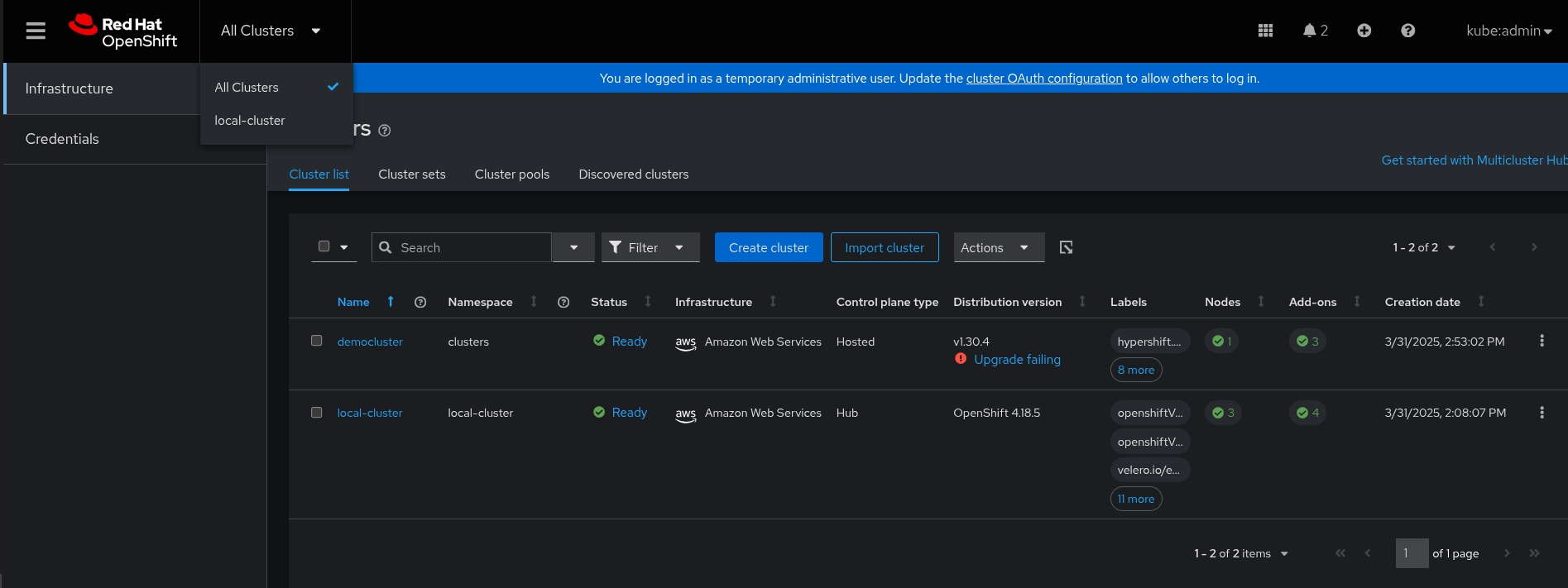 Figure 1. Hosted control plane cluster list
Select for example the democluster to display the Cluster details page. A screen similar to the following is displayed:
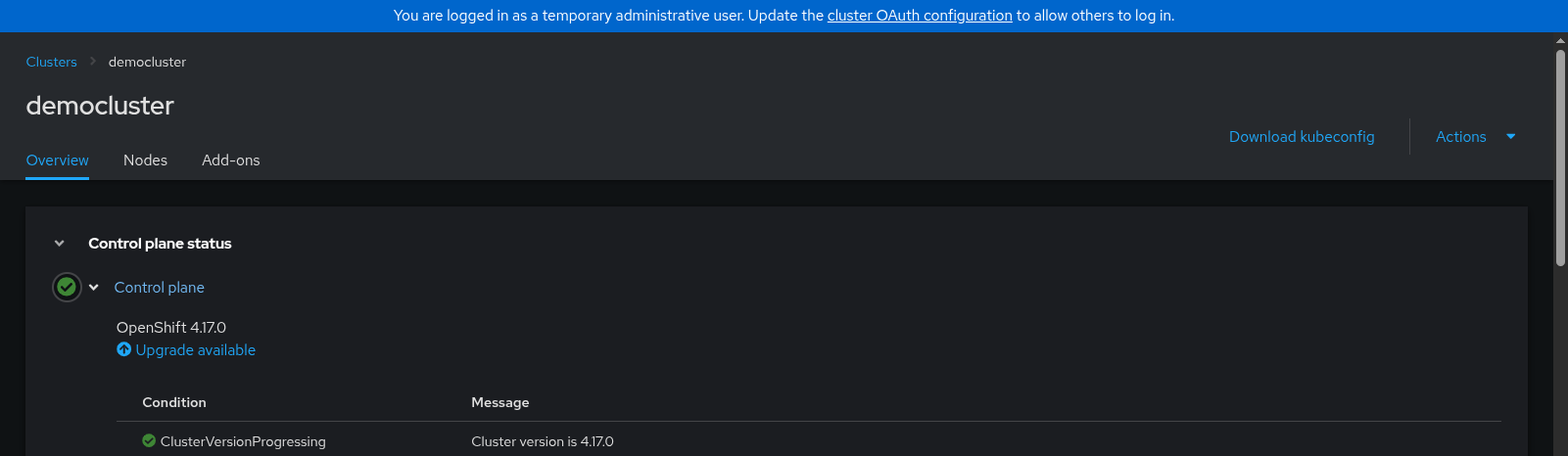 Figure 2. Hosted control plane cluster details
Click Download kubeconfig to download the
kubeconfigfile for the hosted control plane.
Verification
Export the management cluster kubeconfig:
$ export MGMT_KUBECONFIG=</path/to/management-cluster-kubeconfig>Run this command to find the
node-pool-namefor your cluster:$ oc --kubeconfig="$MGMT_KUBECONFIG" get np -AExample outputNAMESPACE NAME CLUSTER DESIRED NODES CURRENT NODES AUTOSCALING AUTOREPAIR VERSION UPDATINGVERSION UPDATINGCONFIG MESSAGE clusters democluster-us-east-1a democluster 1 1 False False 4.20.8 False FalseRun this command to export the downloaded
kubeconfigfile for your hosted control plane:$ export HCP_KUBECONFIG=</path/to/hypershift-cluster-kubeconfig>Use the
kubeconfigfile to view the cluster Operators of the hosted cluster. Enter the following command:$ oc --kubeconfig="$HCP_KUBECONFIG" get coExample outputNAME VERSION AVAILABLE PROGRESSING DEGRADED SINCE MESSAGE console 4.20.8 True False False 57m csi-snapshot-controller 4.20.8 True False False 66m dns 4.20.8 True False False 57m image-registry 4.20.8 True False False 57m ingress 4.20.8 True False False 57m insights 4.20.8 True False False 58m kube-apiserver 4.20.8 True False False 66m kube-controller-manager 4.20.8 True False False 66m kube-scheduler 4.20.8 True False False 66m kube-storage-version-migrator 4.20.8 True False False 58m monitoring 4.20.8 True False False 55m network 4.20.8 True False False 65m node-tuning 4.20.8 True False False 60m openshift-apiserver 4.20.8 True False False 66m openshift-controller-manager 4.20.8 True False False 66m openshift-samples 4.20.8 True False False 57m operator-lifecycle-manager 4.20.8 True False False 66m operator-lifecycle-manager-catalog 4.20.8 True False False 65m operator-lifecycle-manager-packageserver 4.20.8 True False False 66m service-ca 4.20.8 True False False 58m storage 4.20.8 True False False 60mView the running pods on your hosted cluster by entering the following command:
$ oc --kubeconfig="$HCP_KUBECONFIG" get pods -AExample outputNAMESPACE NAME READY STATUS RESTARTS AGE kube-system konnectivity-agent-56gh5 1/1 Running 0 66m kube-system kube-apiserver-proxy-ip-10-0-129-28.ec2.internal 1/1 Running 0 66m open-cluster-management-agent-addon cluster-proxy-proxy-agent-7c7666c8f8-9d2xb 3/3 Running 0 64m open-cluster-management-agent-addon klusterlet-addon-workmgr-56c67649b6-8flx7 1/1 Running 0 64m open-cluster-management-agent-addon managed-serviceaccount-addon-agent-56d8f7c4bd-krtwt 1/1 Running 0 64m openshift-cluster-csi-drivers aws-ebs-csi-driver-node-tvgt9 3/3 Running 0 66m openshift-cluster-node-tuning-operator tuned-kmlsm 1/1 Running 0 66m openshift-cluster-samples-operator cluster-samples-operator-6895b9d4c7-nsm54 2/2 Running 0 64m openshift-console-operator console-operator-67d5f87dcc-hdv5j 1/1 Running 2 (64m ago) 64m openshift-console console-fcb9d74fc-5jkfx 1/1 Running 0 61m openshift-console downloads-57848c99-8t8xn 1/1 Running 0 64m openshift-dns dns-default-n62b6 2/2 Running 0 65m openshift-dns node-resolver-25vsw 1/1 Running 0 66m openshift-image-registry image-registry-5778996bc4-v4dw6 1/1 Running 1 (63m ago) 64m openshift-image-registry node-ca-qf4fv 1/1 Running 0 66m openshift-ingress-canary ingress-canary-rlz5k 1/1 Running 0 65m openshift-ingress router-default-7fc88ff765-88zt6 1/1 Running 0 64m openshift-insights insights-operator-567c5dd9fc-vhkr5 1/1 Running 1 (63m ago) 64m openshift-kube-storage-version-migrator-operator kube-storage-version-migrator-operator-5d64f77d9f-tbrmm 1/1 Running 1 (63m ago) 64m openshift-kube-storage-version-migrator migrator-76b9bc6b54-mjwwn 1/1 Running 0 64m openshift-machine-config-operator kube-rbac-proxy-crio-ip-10-0-129-28.ec2.internal 1/1 Running 0 66m openshift-monitoring alertmanager-main-0 6/6 Running 0 62m openshift-monitoring cluster-monitoring-operator-6589b986c8-bjb2t 1/1 Running 0 64m openshift-monitoring kube-state-metrics-575c55f885-xcwvp 3/3 Running 0 63m openshift-monitoring metrics-server-766fb8749c-qmbkp 1/1 Running 0 63m openshift-monitoring monitoring-plugin-5567ddf44-vgrwx 1/1 Running 0 63m openshift-monitoring node-exporter-gh76w 2/2 Running 0 63m openshift-monitoring openshift-state-metrics-7466fd7977-hqmwv 3/3 Running 0 63m openshift-monitoring prometheus-k8s-0 6/6 Running 0 62m openshift-monitoring prometheus-operator-5cf88995b6-sqqfq 2/2 Running 0 64m openshift-monitoring prometheus-operator-admission-webhook-7d744487ff-8xb7b 1/1 Running 0 64m openshift-monitoring telemeter-client-857df5b745-9v579 3/3 Running 0 62m openshift-monitoring thanos-querier-585746b745-thnfc 6/6 Running 0 63m openshift-multus multus-additional-cni-plugins-njkgb 1/1 Running 0 66m openshift-multus multus-k6ggs 1/1 Running 0 66m openshift-multus network-metrics-daemon-45wq7 2/2 Running 0 66m openshift-network-console networking-console-plugin-78b59bd487-ms4c7 1/1 Running 0 64m openshift-network-diagnostics network-check-source-7fbf9dfccb-ddvld 1/1 Running 0 64m openshift-network-diagnostics network-check-target-vvktk 1/1 Running 0 66m openshift-network-operator iptables-alerter-5s96x 1/1 Running 0 65m openshift-ovn-kubernetes ovnkube-node-9rsw4 8/8 Running 0 66m openshift-service-ca-operator service-ca-operator-7b9f58bd4b-b62m6 1/1 Running 1 (63m ago) 64m openshift-service-ca service-ca-554d4b766c-82h22 1/1 Running 0 64m
