Architecture
The Layered Zero Trust pattern implements a layered zero trust architecture that provides workload identity management, secure communication, secret management, runtime security monitoring, and compliance scanning on Red Hat OpenShift Container Platform.
Layered architecture overview
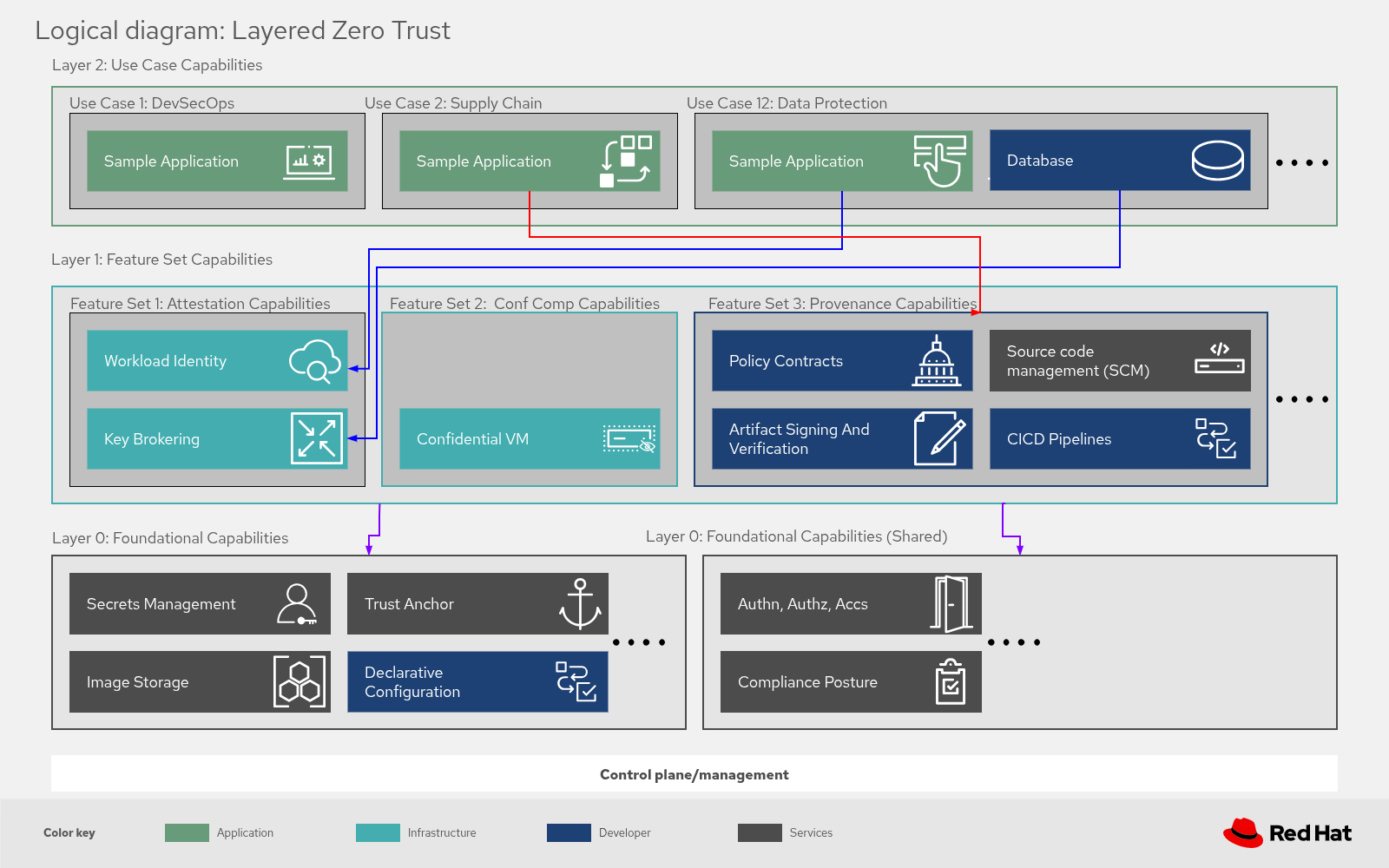
The ZTVP is structured in three decoupled layers, each building on the one below:
Layer 0 — Foundation: The always-deployed security baseline. These components are installed automatically with every ZTVP deployment and provide the core Zero Trust capabilities.
Layer 1 — Feature Sets: Optional capabilities that can be enabled per use case. These extend the foundation with additional security services like supply chain signing, private registries, and network observability.
Layer 2 — Use Cases: Real applications that demonstrate Zero Trust principles in practice. They consume the services provided by Layers 0 and 1.
Layer 0 — Foundation
| Component | What it does | Zero Trust contribution |
|---|---|---|
HashiCorp Vault | Centralized secret storage and management with JWT-based authentication | Dynamic secrets, just-in-time credential injection |
Zero Trust Workload Identity Manager (SPIRE/SPIFFE) | Assigns short-lived cryptographic identities to workloads | No shared secrets, mutual authentication |
Red Hat build of Keycloak | User authentication and SSO via OIDC | Centralized identity, per-application access control |
External Secrets Operator | Synchronizes secrets from Vault into OpenShift Container Platform | Automated secret lifecycle management |
Red Hat Cert Manager | Automated TLS certificate lifecycle | Encrypted communications, daily CA rotation |
Compliance Operator | CIS benchmark scanning and automated remediation | Continuous compliance monitoring |
Red Hat Advanced Cluster Management | Multi-cluster management control plane | Centralized policy enforcement |
Red Hat Advanced Cluster Security | Runtime security monitoring, threat detection and response | Continuous monitoring, automated threat termination |
Layer 1 — Feature Sets
| Component | What it does | Required for |
|---|---|---|
Red Hat Quay | Private OCI image registry | Supply chain security use cases |
Multicloud Object Gateway (NooBaa) | Object storage service for OpenShift Container Platform | Quay storage backend, Network Observability |
Red Hat Trusted Artifact Signer (RHTAS) | Keyless signing and verification of container images and artifacts | Secure supply chain |
Red Hat Trusted Profile Analyzer (RHTPA) | SBOM storage, analysis, and CVE cross-referencing | Supply chain vulnerability analysis |
Red Hat OpenShift Pipelines | Cloud-native CI/CD on OpenShift Container Platform | Automated supply chain workflows |
Network Observability (Loki + FlowCollector) | Network flow monitoring and visualization | Network traffic analysis |
Layer 2 — Use Cases
| Use case | Description |
|---|---|
The | |
Manual walkthrough of container image signing, SBOM generation, and artifact verification using RHTAS and RHTPA. | |
Tekton pipeline automating the build, sign, verify, and deploy workflow end-to-end. |
Sidecar pattern
The sidecar pattern is a deployment model where a separate container runs alongside the main application to handle auxiliary tasks. In an OpenShift Container Platform environment, pods simplify this by ensuring the sidecar and main application share the same lifecycle. This approach benefits Zero Trust architectures by enabling centralized enforcement of security policies such as authentication, authorization, traffic encryption (mTLS), rate limiting, auditing, and logging — without requiring developers to add this logic to every microservice.
The Layered Zero Trust pattern uses the sidecar approach to offload critical security functions from the main application. This centralizes policy enforcement, simplifies development, and separates security concerns.
Applied sidecar pattern: Data protection
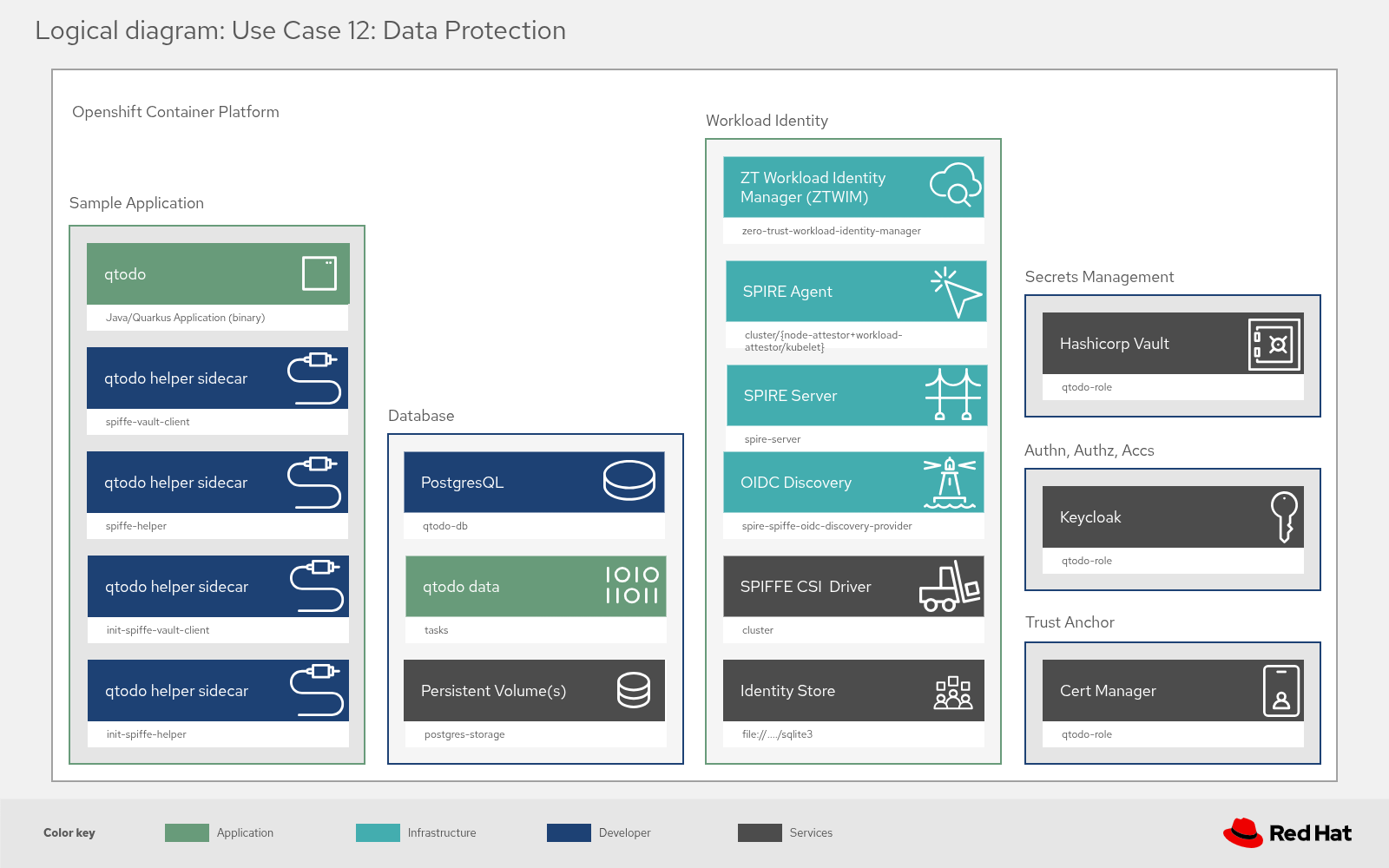
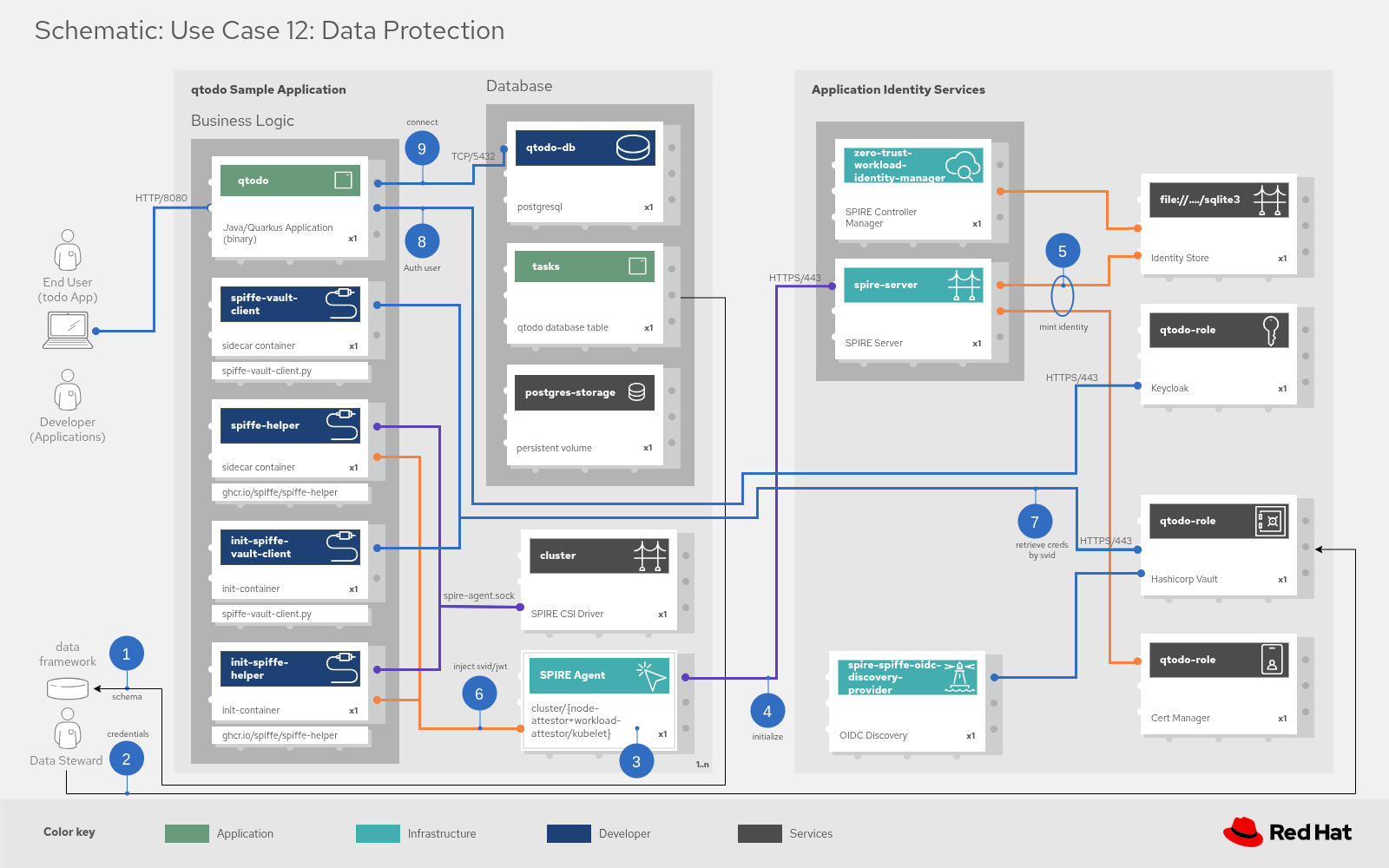
The following diagrams illustrate how the sidecar pattern is applied in practice to solve the Data Protection use case. They demonstrate how an application (qtodo) retrieves database credentials dynamically without hard-coding secrets.
Logical structure
The logical structure diagram shows the composition of the application pod and its relationship to the infrastructure.
Decoupled components: The
qtodoapplication logic is separated from security functions. The application container runs alongside helper sidecars (spiffe-vault-client, spiffe-helper) and init containers.Infrastructure layers: The sidecars bridge the gap between the application and the platform services:
Workload identity: The sidecars interface with SPIRE to prove the pod’s identity.
Secret management: They connect to HashiCorp Vault to fetch secrets.
Trust anchors: Keycloak and Cert Manager provide the root trust for the ecosystem.
Schematic workflow
The schematic diagram details the step-by-step execution flow:
Identity minting (Steps 3-6): Upon startup, the SPIRE Agent validates the pod (via node attestors and kubelet) and mints a cryptographic identity (SPIFFE ID).
Secret retrieval (Step 7): The spiffe-vault-client sidecar uses this verified identity to authenticate with HashiCorp Vault and request the specific credentials needed for the database.
Secure access (Steps 8-9): The credentials are passed to the application, allowing it to authenticate and establish a connection to the PostgreSQL database securely.
Deployment variants
The pattern supports multiple deployment configurations:
| Configuration file | Description |
|---|---|
| Default hub cluster deployment with the full Layer 0 foundation |
| Development variant for Confidential Containers integration |
Feature variant system
Layer 1 features can be enabled or disabled independently using the gen-feature-variants.py script.
For example, to generate a values-hub.yaml with the supply chain feature set enabled:
$ python3 scripts/gen-feature-variants.py --features supply-chain --registry-option 1See the Feature Variant Generator in the repository for detailed information.
