Pre-requisites
💻 Platform and Tools
Active Subscription: You must have a currently active Red Hat OpenShift Platform Plus subscription.
Hub Cluster Configuration: The Hub cluster must have both the Ansible Automation Platform and Advanced Cluster Management (ACM) installed.
Cluster Creation Access: You’ll need access to the Red Hat Hybrid Cloud console to create an OpenShift cluster. Navigate to OpenShift -> Red Hat OpenShift Container Platform -> Create cluster on the Red Hat Hybrid Cloud console.
Command Line Interfaces: The Red Hat OpenShift CLI must be installed. The Helm binary is required. Installation instructions can be found at Installing Helm.
Additional Tools: Consult the Patterns documentation for details on any necessary additional installation tool dependencies at Patterns.
🔑 Accounts and Access
GitHub Access: A GitHub account is necessary, along with a personal access token that possesses both repository read and write permissions.
IDM Setup: An Identity Management Server (IDM) must be set up and configured with a defined domain.
IDM Installation: Red Hat IDM must be installed and configured.
Environment Access: You must have access to a Cloud or on-prem environment.
Glossary
- Red Hat OpenShift Container Platform : OCP is an enterprise Kubernetes platform that enables organizations to build, deploy, and manage containerized applications at scale.
- Red Hat Ansible Automation Platform : AAP is an enterprise-grade automation solution that enables organizations to automate IT processes, application deployments, and infrastructure management across hybrid and multi-cloud environment
- Red Hat Advanced Cluster Management : centralized platform for managing multiple OpenShift clusters across on-premises, hybrid, and multi-cloud environments.
- Hub Cluster : Control plane cluster which deploys & manages OpenShift cluster on targeted cloud or on-prem environment.
- Spoke Cluster : Targeted cluster which is deployed with readily available DevOps tools for a developer.
Future enhancements
- Enhance current pattern to support deployment in STACKIT, OpenTelekom cloud, BareMetal OpenShift cluster including hosted control plane.
- Vertical Expansion of pattern: To introduce role-specific cartridges to serve diverse user needs (e.g., an AI cartridge deploying workbenches and necessary tools for AI engineers).
Architecture
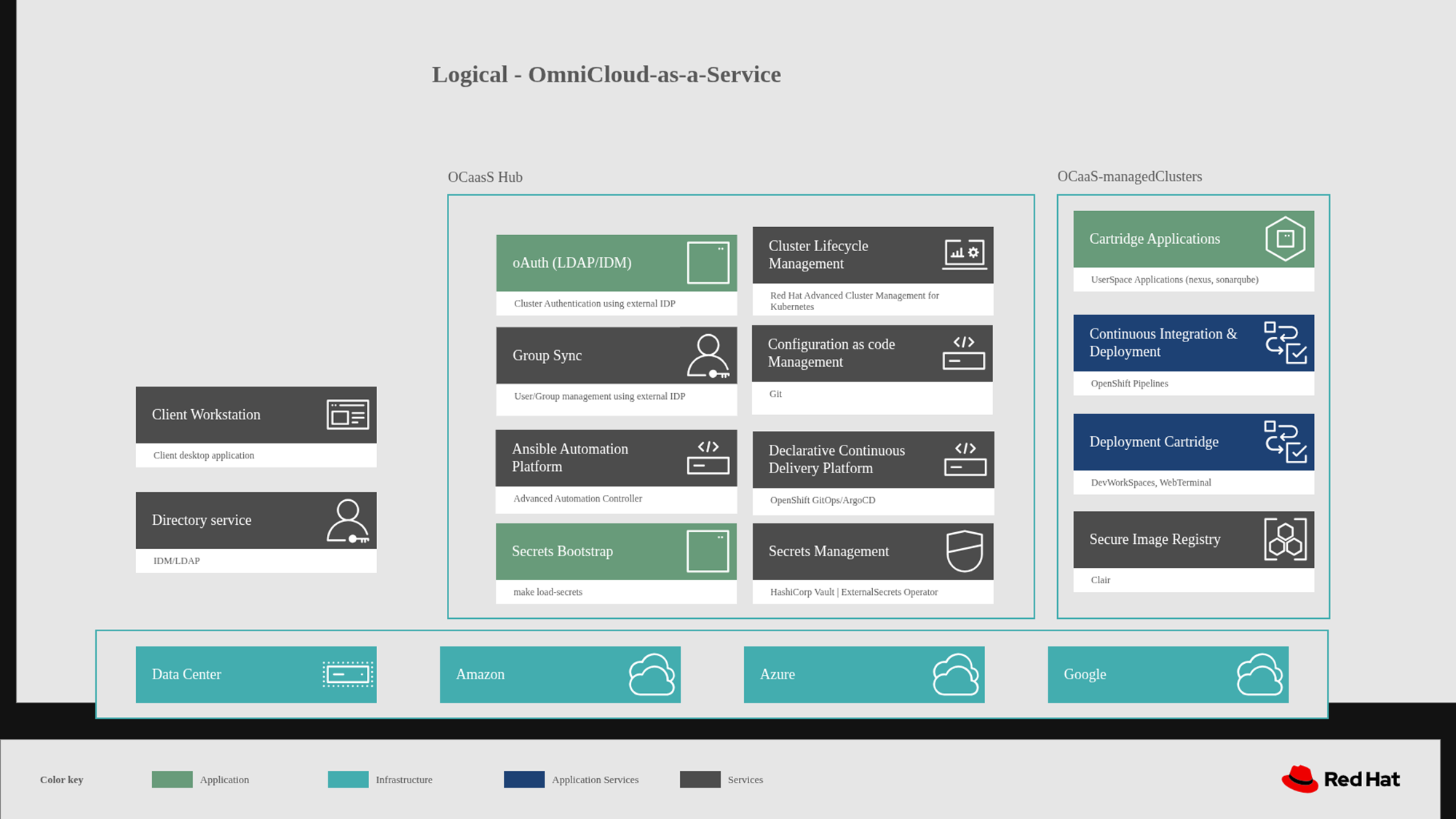
The Omnicloud as a Service setup currently spans multiple environments, with an OpenShift cluster—equipped with RHACM and AAP—serving as a prerequisite. When this pattern is executed, it provisions an OpenShift cluster in the chosen environment, whether GCP, Azure, or AWS.
Execution of pattern also involves importing of newly deployed cluster into RHACM, and a DevOps cartridge containing preconfigured development tools are deployed in a dedicated namespace for the developer. Additionally, an Active Directory (AD) user account is created and integrated with OpenShift to enable domain-based authentication.
Key Concepts
This section describes a set of key concepts essential for creating validated pattern. This material provides you with foundational knowledge to get familiar with the validated patterns framework. The content offers a clear and structured starting point, helping you understand and effectively apply these concepts in your projects.
Helm and Kustomize
- Two options are available that allow you to manage the lifecycle of Kubernetes applications you want to deploy with the validated patterns framework. The tools supported are Kustomize and Helm.
Kustomize:
Kustomize is a configuration management tool used to make declarative changes to application configurations and components and preserve the original base YAML files. Kustomize allows you to manage Kubernetes resource files in a declarative manner, using a set of layered configurations. Kustomize excels at managing predefined configurations, but it requires that all customizations be stored as overlays in Git. This approach can lead to a proliferation of overlay directories, becoming disorganized and complex to manage as the number of developers and components grows, making them increasingly difficult to read.Helm:
Helm is a package manager for Kubernetes, which simplifies the process of defining, installing, and upgrading complex Kubernetes applications. Instead of ad-hoc patching of YAML files, Helm uses a templating language where variables are defined in the raw YAML and combined with actual values at runtime. This allows for the use of conditionals to adapt configurations to different environments and loops to dynamically create multiple instances consistently, such as generating a list of 12 namespaces. It manages Kubernetes manifests using a packaging format called Charts.
Helm’s templating capabilities, flexibility in handling variables, and advanced features such as conditionals and loops makes it the preferred mechanism for deploying applications in the validated patterns framework. It streamlines the configuration process, reduces complexity, and enhances maintainability, providing a robust solution for managing Kubernetes deployments.
Helm in validated patterns
Helm is the preferred tool for deploying applications within the validated patterns framework. Helm charts are packages that describe a set of Kubernetes resources ready for deployment, including customizable values for application deployment and functions for distributing charts and updates. A Helm chart consists of files structured to include chart metadata such as name and version, resource definitions, and supporting materials. This structure facilitates clear organization and management of Kubernetes resources.
A minimal Helm chart includes:
sample/
├── Chart
├── templates
│   └── example.yaml
└── values.yaml
- The Chart.yaml file contains chart metadata, such as the name and version of the chart.
- The templates directory contains files that define application resources such as deployments.
- The values.yaml file contains default values for the chart.
ArgoCD and Helm Integration
ArgoCD integrates with Helm to provide a powerful GitOps-based deployment mechanism. The validated patterns framework uses ArgoCD and Helm to streamline application deployment by defining applications as Helm charts stored in Git repositories. ArgoCD is the tool of choice to apply the desired state of desired application to the target cluster environment.
ArgoCD automates the deployment and synchronization of these applications to OpenShift Container Platform clusters, ensuring consistency, reliability, and efficiency in managing Kubernetes applications. This integration supports automated, declarative, and version-controlled deployments, enhancing operational efficiency and maintaining application state across environments. ArgoCD helps implement continuous deployment for cloud-native applications.
Values
Values files are essential for customizing settings in applications, services, or validated patterns, particularly in Kubernetes deployments using Helm charts. These files, written in plain YAML format, provide a structured and flexible approach to set parameters and configurations for deploying validated patterns. The values files contain the variables that drive the configurations of your namespaces, subscriptions, applications, and other resources. The variables defined in your values files are referenced within your Helm chart templates. This ensures consistency and enables dynamic configurations. Combined with the power of the Helm’s templating language you can implement conditionals and loops for adaptable and scalable configurations.
Key characteristics of values files include:
Plain YAML Format: The human-readable and easy-to-edit syntax of YAML makes configuration settings accessible and straightforward to manage.
Hierarchical Nature: Values files support a hierarchy of values, allowing logical organization and structuring of configurations, which is especially useful in handling complex deployments. In Helm charts, values files define configuration settings for deploying applications and managing resources within an OpenShift Container Platform cluster. They enable flexible, per-cluster customization while ensuring consistency with the overall validated pattern. This ensures that organizations can achieve efficient, secure, and consistent deployments across multiple OpenShift Container Platform clusters.
A common practice is to use a base values file, such as values-global.yaml, for global settings, and then have cluster-specific values files for example values-cluster1.yaml, values-cluster2.yaml that override or add to the global settings. This approach allows for comprehensive customization while maintaining a centralized and organized configuration structure, promoting best practices for deployment and resource management.
Applications
The applications section in the Helm values file plays a crucial role in defining and managing the deployment of various applications within an OpenShift Container Platform cluster. By leveraging Helm charts and adhering to validated patterns, it ensures consistency, best practices, and simplified management, leading to reliable and scalable application deployments.
The path field in each application entry points in the values file points to the location of the Helm chart and associated configuration files. These charts contain the Kubernetes manifests and configuration necessary to deploy the application. Helm charts are used to package Kubernetes applications and manage their deployment in a consistent and reproducible manner.
When these applications are deployed, the following Kubernetes resources are typically created:
Deployments: Define the desired state and replicas for the application’s pods.
Services: Expose the application’s pods to other services or external traffic.
ConfigMaps and Secrets: Store configuration data and sensitive information.
PersistentVolumeClaims (PVCs): Request storage resources for the application.
Ingress or Routes: Provide external access to the application.
RBAC (Role-Based Access Control): Define access permissions and roles.
Red Hat Advanced Cluster Management (RHACM)
One of the applications deployed by the Validated Patterns Operator is Red Hat Advanced Cluster Management (RHACM). RHACM is a comprehensive solution designed to manage multiple OpenShift Container Platform clusters, whether that is ten clusters or a thousand clusters and enforce policies across those clusters from a single pane of glass.
RHACM plays a pivotal role in the validated pattern framework by providing robust capabilities for managing Kubernetes clusters and enforcing policies across heterogeneous environments. RHACM is only installed when a pattern spans multiple clusters. It supports operational efficiency, scalability, compliance, and security, making it an essential tool for organizations looking to manage their Kubernetes infrastructure effectively.
The Validated Patterns framework uses ACM policies to ensure that applications, targeted for specific clusters, are deployed to the appropriate cluster environments. The single pane of glass allows you to see information about your clusters. RHACM supports multiple cloud providers out of the box and it gives you a clear insight into the resources for that cluster using the observability feature.
ClusterGroups
In a validated pattern, a ClusterGroup organizes and manages clusters sharing common configurations, policies, or deployment needs, with the default group initially encompassing all clusters unless assigned elsewhere. Multiple cluster groups within a pattern allow for tailored management, enabling specific configurations and policies based on roles, environments, or locations. This segmentation enhances efficiency, consistency, and simplifies complex environments. In the validated patterns framework, a ClusterGroup is a key entity representing either a single cluster or a collection of clusters with unique configurations, determined by Helm charts and Kubernetes features. Typically, a ClusterGroup serves as the foundation for each pattern, with the primary one named in values-global.yaml, often referred to as hub. Managed ClusterGroups can also be defined, specifying characteristics and policies for additional clusters. Managed cluster groups are sets of clusters, grouped by function, that share a common configuration set. There is no limitation on the number of groups, or the number of clusters within each group.
When joining a managed cluster to Red Hat Advanced Cluster Management (RHACM) or deploying a new cluster with RHACM, it must be assigned to at least one ClusterGroup. RHACM identifies the managed cluster’s membership in a ClusterGroup and proceeds to set up the cluster, including installing the RHACM agent. Once the setup is complete, RHACM deploys GitOps and supplies it with information about the ClusterGroup. GitOps then retrieves the associated values file and proceeds to deploy the Operators, configurations, and charts accordingly.
GitOps
GitOps is a way to manage cloud-native systems that are powered by Kubernetes. It leverages a policy-as-code approach to define and manage every layer of the modern application stack from infrastructure, networking application code, and the GitOps pipeline itself.
The key principle of GitOps are:
Declarative: The methodology requires describing the desired state, achieved through raw manifests, helm charts, kustomize, or other forms of automation.
Versioned and immutability: Git ensures versioning and immutability, serving as the definitive source of truth. Version control and historical tracking offer insights into changes that impact the clusters.
Pulled automatically: The GitOps controller pulls the state automatically to prevent any errors introduced by humans, and it also allows the application an opportunity to heal itself.
Continuously reconciled: The GitOps controller has a reconciliation loop that by default runs every 3 minutes. When the reconciler identifies a diff between git and the cluster, it will reconcile the change onto the cluster during the next synchronization.
GitOps within the validated pattern framework ensures that infrastructure and application configurations are managed declaratively, consistently, and securely. GitOps ensures consistency across our environments, platforms and applications.
Secrets
Enterprise applications, especially in multi-cluster and multi-site environments, require robust security measures, including the use of certificates and other secrets to establish trust. Managing these secrets effectively is crucial.
Ignoring security during the development of distributed enterprise applications can lead to significant technical debt. The DevSecOps model addresses this by emphasizing the need to integrate security early in the development lifecycle, known as “shifting security to the left.”
In the OpenShift Container Platform, secrets are used to securely store sensitive information like passwords, API keys, and certificates. These secrets are managed using Kubernetes secret objects within validated patterns, ensuring consistent, secure, and compliant deployments. This approach promotes best practices for security and simplifies the management of sensitive data across OpenShift Container Platform Container Platform deployments.
Shared values
Shared values files are YAML files used in a validated pattern to centralize and manage configuration settings. They define common parameters and settings that can be reused across multiple clusters, applications, and environments. This approach promotes consistency and simplifies configuration management.
Shared values files are a powerful mechanism in a validated pattern, enabling centralized, consistent, and reusable configuration management across multiple clusters and environments. By defining global settings and leveraging cluster-specific overrides, they ensure that configurations are both standardized and flexible enough to accommodate specific needs of individual clusters.
Ansible Automation Platform
Logging in to the Ansible Automation Platform
The default login user for the AAP interface is admin, and the password is randomly generated during installation. This password is required to access the interface
Logging in using a secret retrieved from the OpenShift Console
Follow these steps to log in to the Ansible Automation Platform using the OpenShift console:
In the OpenShift console, go to Workloads > Secrets and select the ansible-automation-platform project if you want to limit the number of secrets you can see.
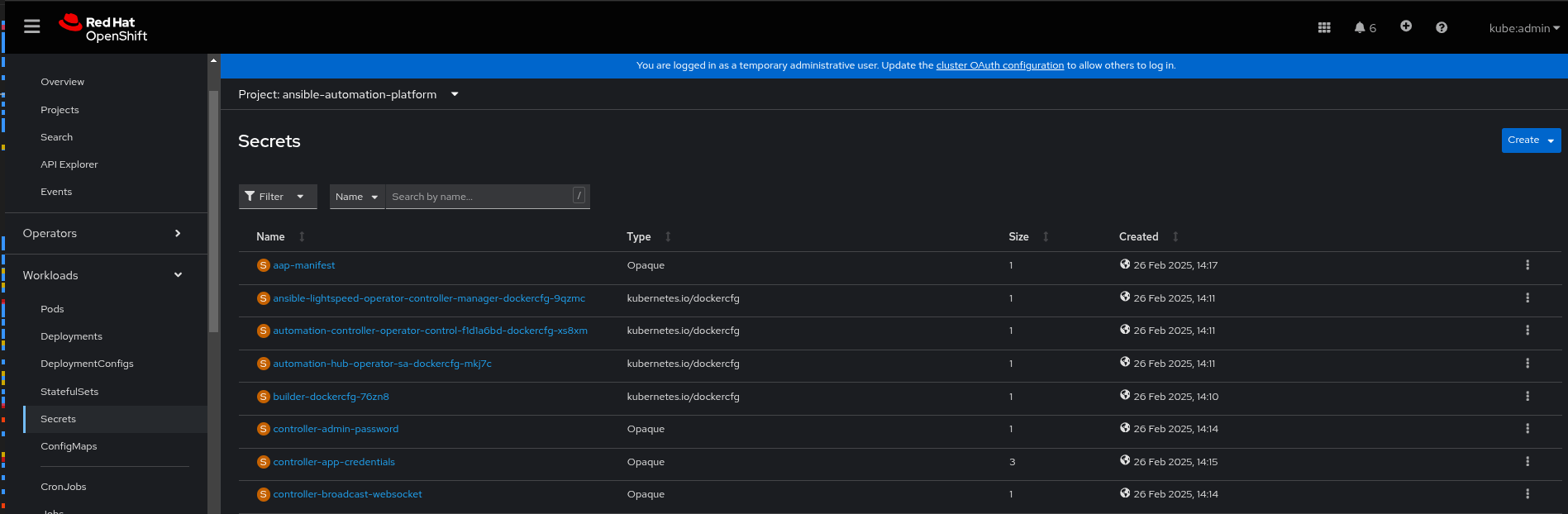
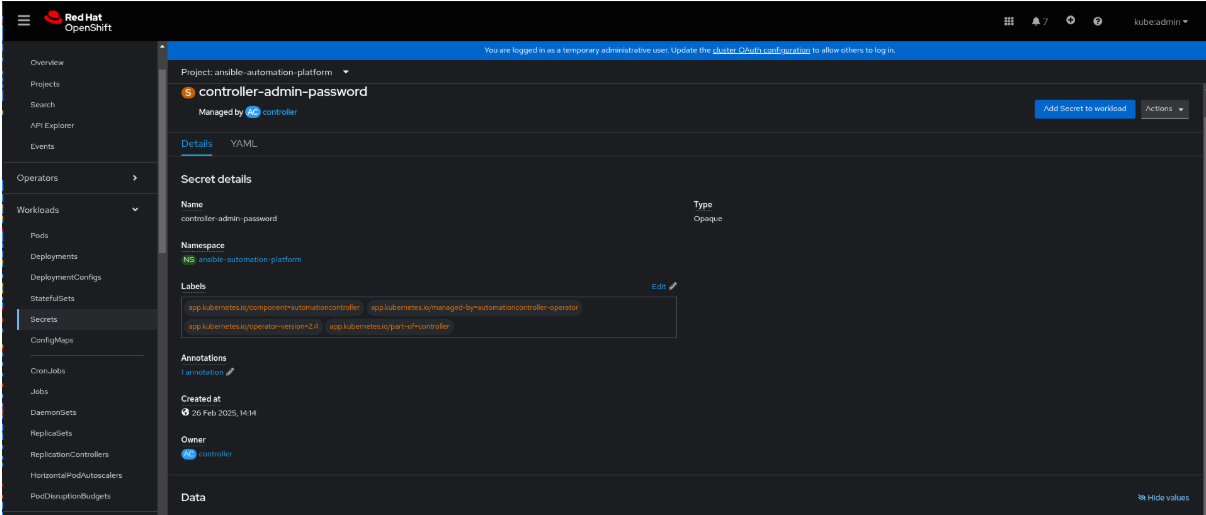
Select the controller-admin-password. In the Data field click Reveal values to display the password.
Under Networking > Routes, click the URL for the aap route to open the Ansible Automation Platform interface.
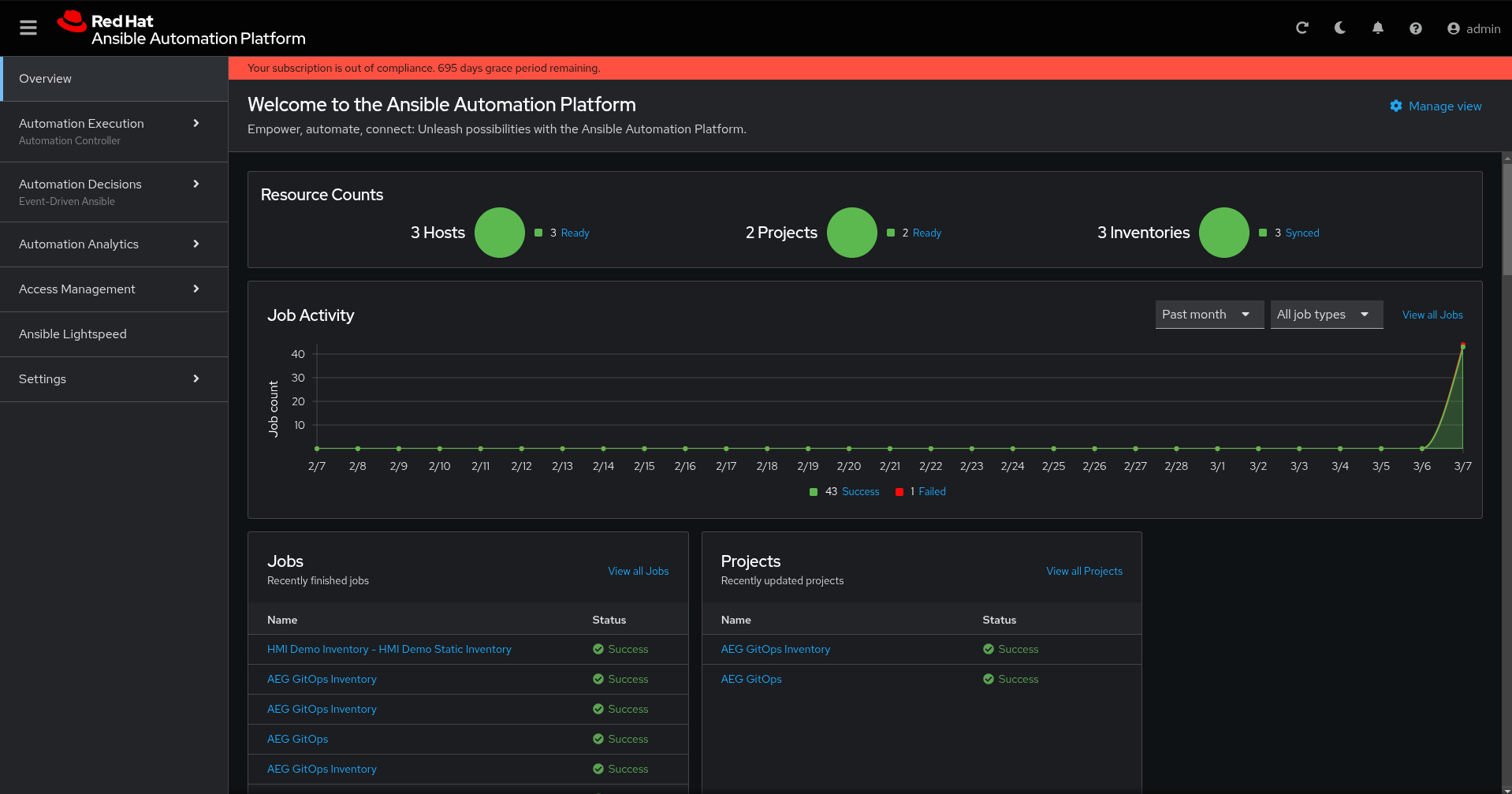
Log in using the admin user and the password you retrieved from the aap-admin-password secret. A screen similar to the following appears:
Automation Breakdown
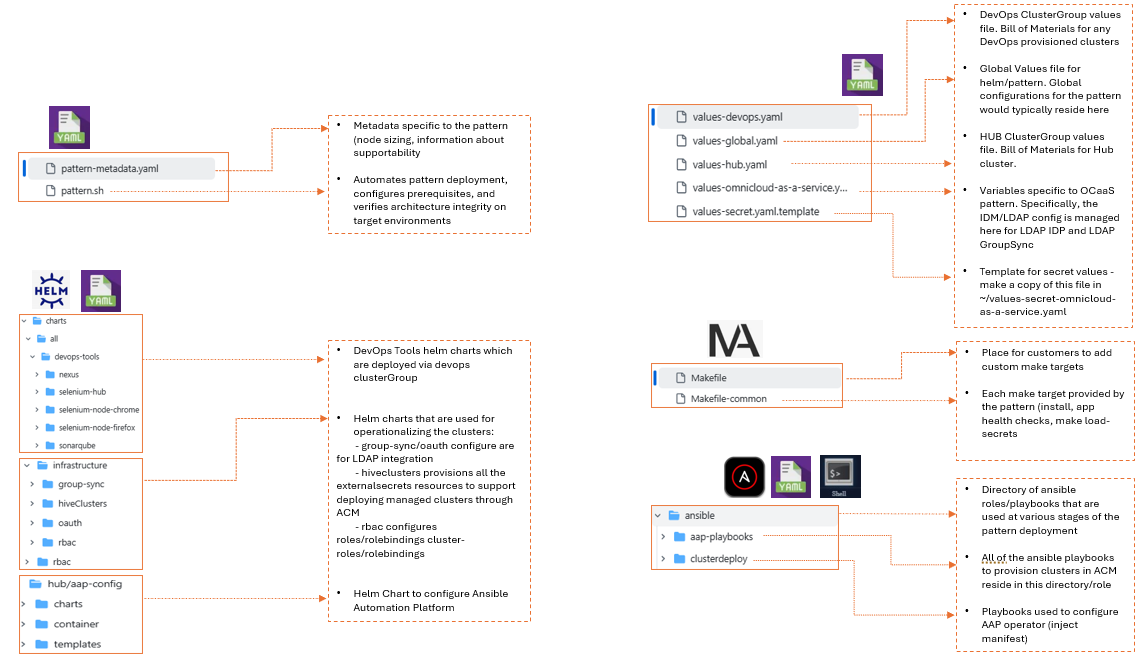
Technical Requirements
Source code repository: https://github.com/validatedpatterns-sandbox/omnicloud-as-a-service.git
branch: main
OCaaS Workflow deep dive
This pattern is currenty tested on AWS, Azure & GCP environment running with Red Hat OpenShift cluster version 4.19. The codebase utilizes the following languages and tools: Shell, Python, Makefile, and Docker
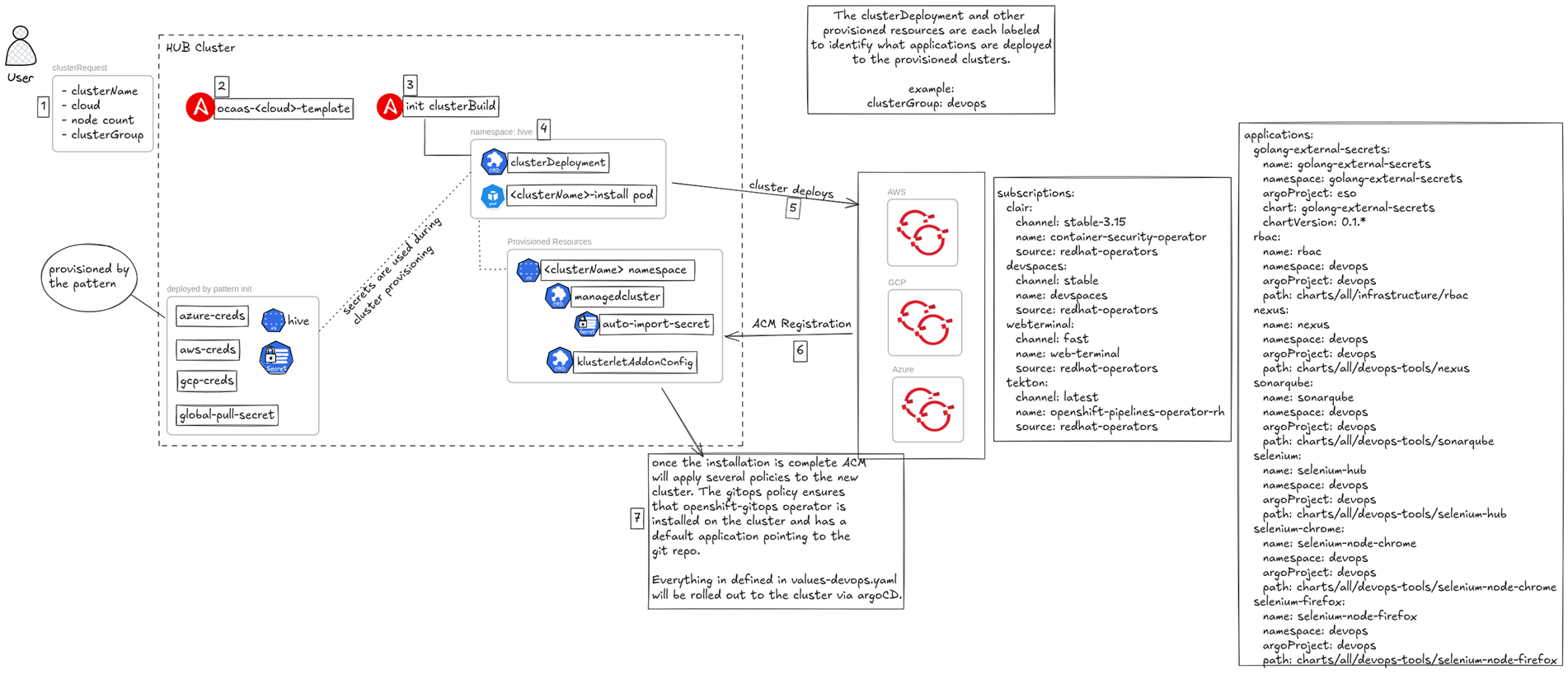
This workflow demonstrates a robust, automated solution for self-service provisioning and de-provisioning of Red Hat OpenShift Container Platform (OCP) clusters across multiple cloud providers (e.g., Google Cloud, Azure, AWS). The automation leverages Ansible Automation Platform (AAP) to manage the deployment tasks and Red Hat Advanced Cluster Management (RHACM) to orchestrate and manage the resulting clusters. This approach enables rapid, consistent, and repeatable cluster creation on demand.
Workflow Steps and Components
User Request and Initiation
User Interaction: A User initiates a request, typically through a self-service portal or an API call (represented by request and service now).
Input Parameters: The request specifies the required cluster details, such as:
name: demo (Cluster Name)
cloud: aws (Target Cloud Environment)
nodes: 2 (Initial Worker Node Count)
Actions: The user can choose to create or destroy the cluster
Ansible Automation Platform (AAP) Execution
Task Invocation: The user’s action triggers an associated job template within AAP.
Cluster Creation: The create action runs job_template_build_<cloud_provider> (e.g., job_template_build_aws).
Cluster Destruction: The destroy action runs job_template_destroy_cluster.
Automation Logic: The AAP Job Templates contain the necessary Ansible Playbooks to interact with the chosen cloud provider’s APIs and provision the underlying infrastructure and OpenShift components (e.g., using the Red Hat OpenShift installer).
Cluster Management with RHACM
Management Integration: After the cluster is built by AAP, the process is handed over to RHACM.
RHACM Components: RHACM utilizes specific Kubernetes Custom Resources (CRs) to manage the cluster lifecycle and registration:
clusterdeployment: Defines the cluster installation parameters and ties back to the cluster resources in the cloud.
managedcluster: Represents the discovered or imported cluster within RHACM, enabling central governance.
klusterletAddOnConfig: Configures the agents (klusterlet) and capabilities installed on the managed cluster (e.g., policy enforcement, observability).
auto-import-secret: A Kubernetes Secret containing the credentials necessary for the newly provisioned OpenShift cluster to automatically register itself with the RHACM hub.
Multi-Cloud Environment
Supported Platforms: The architecture is explicitly designed for a multi-cloud strategy, demonstrated by the logos for Google Cloud , Azure , and AWS . The use of parameterization (cloud: aws) ensures the correct automation runs for the target environment.
Network requirements:
For connected environments:
- Access to public container registries
- Access to GitHub repositories
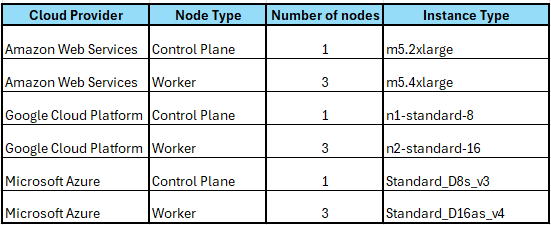
Sizing of Hub cluster:
Table 1. Hub cluster minimum requirements
Getting Started
Consuming a pattern
Install an OpenShift Cluster on any cloud environment, here we have used AWS as our Control plane (Hub) cluster.
Update the required OpenShift configuration and secrets.
Install OpenShift CLI :
[https://console.redhat.com/openshift/downloads]Login to the OpenShift cluster using:
$ oc login --token=<API token> --server=<API URL:6443>From the Omnicloud as a service repository on GitHub click the Fork button.
Clone the forked copy of this repository by running the following command
$ git clone https://github.com/validatedpatterns-sandbox/omnicloud-as-a-service.gitNavigate to your repository: Ensure you are in the root directory of your Git repository by using:
$ cd /path/to/your/repositoryRun the following command to set the upstream repository:
$ git remote add -f upstream https://github.com/validatedpatterns-sandbox/omnicloud-as-a-service.gitVerify the setup of your remote repositories by running the following command:
$ git remote -vRun the pattern to initiate the deployment
$ ./pattern.sh make installWait: The pattern installation takes a few minutes to complete.
Verify the Pattern installation
$ oc get apps -A
[Expected Output]
NAMESPACE                     NAME                       SYNC STATUS   HEALTH STATUS
omnicloud-as-a-service-hub   aap-config                  Synced        Healthy
omnicloud-as-a-service-hub   acm                         Synced        Healthy
omnicloud-as-a-service-hub   golang-external-secrets     Synced        Healthy
omnicloud-as-a-service-hub   group-sync-config           Synced        Healthy
omnicloud-as-a-service-hub   hive-clusters               Synced        Healthy
omnicloud-as-a-service-hub   ldap-oauth                  Synced        Healthy
omnicloud-as-a-service-hub   vault                       Synced        Healthy
openshift-gitops             omnicloud-as-a-service-hub  Synced        Healthy
Using Omnicloud as a Service pattern to deploy developer clusters
This portion of the pattern is still under active development
NOTE As previously mentioned, the cluster parameters will be passed in via ServiceNow or some other platform. However, for this MVP we have a few different ways of deploying the managedclusters. Regardless of how the playbook is called the overall flow won’t change.
A cluster request is sent to Ansible
Ansible provisions the necessary secrets and manifests from templates and applies them to the management cluster.
The hive service (hosted on RHACM cluster) begins provisioning the cluster (clusterDeployment resource)
A
managedClusterresource is created via Ansible to start the importing of the cluster into RHACMA secret called
auto-import-secretis created in the$CLUSTER_NAMEnamespace from thekubeconfigsecret which is auto-generated after the creationg of theclusterDeploymentresource - RHACM needs this to import the clusterThe
clusterGroup=devopslabel tells RHACM to apply the gitops policies from the pattern and when then provisioning is complete will roll out each of the resources declared in thevalues-devops.yamlvalues file in the root of the git repository.
Testing
Verify the status of the cluster deployment through RHACM. The “All Clusters” tile view in RHACM displays the deployment progress sequentially according to the tasks being executed.
Log in to the spoke cluster deployed in the target cloud environment.
i. Administrator: Retrieve the kubeadmin credentials from the “All Clusters” view on the Hub cluster by navigating to the Infrastructure > Clusters tile.
ii. Developer: Access the cluster using the provided Active Directory (AD) credentials.
Validate user permissions by creating a new pod and deployment within the assigned namespace. Confirm that the AD user has access to routes, services, and other workload tabs in the namespace.
Verify the deployment of tools: Ensure a dedicated namespace with the required DevOps toolsets is available for use.
