Secret management for the RHOSO GitOps pattern
The RHOSO GitOps pattern requires secrets for OpenStack service passwords, SSH
key pairs, bare-metal controller credentials, and container registry
authentication. You can provide these secrets in two ways depending on whether a
secure storage backend is available. The two approaches can also be combined: for
example, store shared credentials (registry, subscription) in the backend while
injecting service-specific passwords as bootstrap_secrets, or use
onMissingValue: generate to let the backend generate passwords at deployment
time.
For the canonical list of required secrets, see Providing secure access to the RHOSO services in the Red Hat OpenStack Services on OpenShift documentation.
Choosing a secrets approach
Review the following approaches before you deploy the pattern.
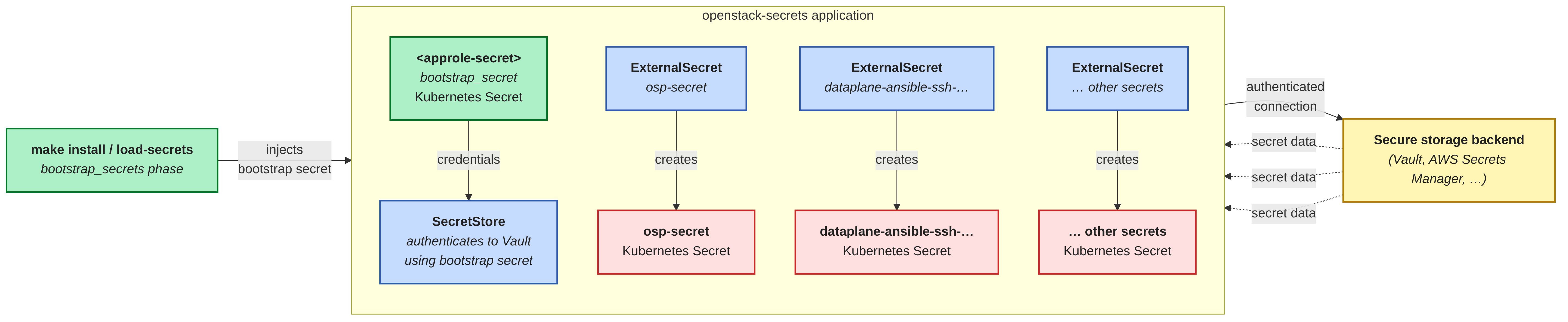
Secure storage backend and External Secrets Operator
This is the recommended approach for production deployments. You store secrets
in a secure storage backend (for example HashiCorp Vault, AWS Secrets Manager,
or any
provider supported by the External Secrets Operator).
ExternalSecret resources project these secrets into the openstack namespace
through a SecretStore.
The framework does not install the storage backend or the External Secrets Operator
automatically. You must include the External Secrets Operator through the operator-dependencies
Argo CD application by using a Kustomize component from the upstream
secrets components.
The openstack-secrets Argo CD application deploys the SecretStore and
ExternalSecret resources that pull secrets from the backend.
This approach uses the following configuration:
The bootstrap secret (for example
vault-approle-secret-id) is defined as abootstrap_secret. The framework injects it into theopenstacknamespace duringmake installso that the External Secrets OperatorSecretStorecan authenticate against the backend.All other secrets are defined under the
secrets:section of thevalues-secret.yamlfile. The framework loads them into the backend duringmake load-secrets.ExternalSecretresources, deployed by theopenstack-secretsArgo CD application, fetch secrets from the backend and create the corresponding KubernetesSecretobjects.
Direct injection without an external store

Use this approach when you do not have a secure storage backend. All secrets are
defined as bootstrap_secrets in the values-secret.yaml file. The framework
injects them as Kubernetes Secret objects during make install. No storage
backend or External Secrets Operator is installed.
When you use this approach, configure the following:
Set
global.secretStore.backendto"none"invalues-global.yaml.Define every required secret under the
bootstrap_secrets:section.Leave the
secrets:section empty.
Required secrets
The RHOSO GitOps pattern requires the following secrets in the openstack
namespace. The values-secret.yaml.template file in the pattern repository
contains placeholder entries for each secret.
| Secret name | Key fields | Purpose |
|---|---|---|
|
| Authentication credential for the External Secrets Operator |
| Multiple service and database password fields | OpenStack service passwords (for example |
|
| Root password for bare-metal data plane nodes. |
|
| SSH key pair for Ansible provisioning of data plane nodes. |
|
| Libvirt authentication password. |
|
| SSH key pair for Nova live migration. |
|
| Redfish BMC credentials for bare-metal node management. |
|
| Container registry credentials for EDPM nodes (JSON format). |
|
| Red Hat Subscription Manager credentials for EDPM nodes. |
Configuring secrets with a secure storage backend
Prerequisites
You have forked and cloned the rhoso-gitops repository.
You have deployed a secure storage backend and have an authentication credential (for example an AppRole secret ID) available.
You have a Git repository with Kustomize overlays that define the
SecretStoreandExternalSecretresources for theopenstacknamespace.You have the OpenStack service passwords, SSH key pairs, BMC credentials, and registry credentials listed in the Red Hat OpenStack Services on OpenShift documentation.
Procedure
Include the External Secrets Operator in the
operator-dependenciesapplication by adding a Kustomize component inoverrides/values-rhoso-gitops.yaml. The following example uses the Red Hat build of the External Secrets Operator:applications: operator-dependencies: kustomize: components: - "https://github.com/openstack-k8s-operators/gitops/components/secrets/external-secrets-operator/redhat?ref=<gitops-tag>"For other External Secrets Operator variants, see the upstream components/secrets README.
Enable the
openstack-secretsapplication in the same overrides file. This application deploys theSecretStoreandExternalSecretresources that pull secrets from the backend:openstack-secrets: enabled: true repoURL: "https://github.com/<your_organization>/<your-gitops-overlay>.git" path: "<path-to-eso-overlay>" targetRevision: "<branch-or-tag>"Extract the authentication credential from your secure storage backend (for example an AppRole secret ID) and save it to a file:
$ echo -n "<approle-secret-id>" > ~/vault-approle-secret-idCreate a
values-secret.yamlfile based on the template. Include the bootstrap secret for the backend credential and define all other secrets under thesecrets:section for backend injection:version: "2.0" bootstrap_secrets: - name: vault-approle-secret-id targetNamespaces: - openstack fields: - name: id path: ~/vault-approle-secret-id onMissingValue: error secrets: []Install the pattern:
$ ./pattern.sh make installVerify that the
ExternalSecretresources are synchronized:$ oc get externalsecrets -n openstackEach
ExternalSecretshows aSecretSyncedstatus when the External Secrets Operator has created the corresponding KubernetesSecret.
Configuring secrets with direct injection
Prerequisites
You have forked and cloned the rhoso-gitops repository.
You have the OpenStack service passwords, SSH key pairs, BMC credentials, and registry credentials listed in the Red Hat OpenStack Services on OpenShift documentation.
Procedure
Set the secret store backend to
noneinvalues-global.yaml:global: secretStore: backend: "none"Copy the secrets template and edit it:
$ cp values-secret.yaml.template ~/values-secret-rhoso-gitops.yamlReplace every
CHANGEME_*placeholder with the actual value. For SSH key pairs, set thepath:field to point at your local key files. Secret values must be in plain text, not base64-encoded.Install the pattern:
$ ./pattern.sh make installVerify that the secrets exist in the
openstacknamespace:$ oc get secrets -n openstack
